$ cd ~/projects/claude-tts
Claude TTS
Claude Code narrates its work out loud with offline neural TTS. Piper + FFmpeg, driven by hooks.
- dev tools
- ai
🔊 claude-tts
Claude Code, out loud.
A short spoken summary at every step while Claude Code works, written by Claude and voiced on your Mac with offline neural TTS.





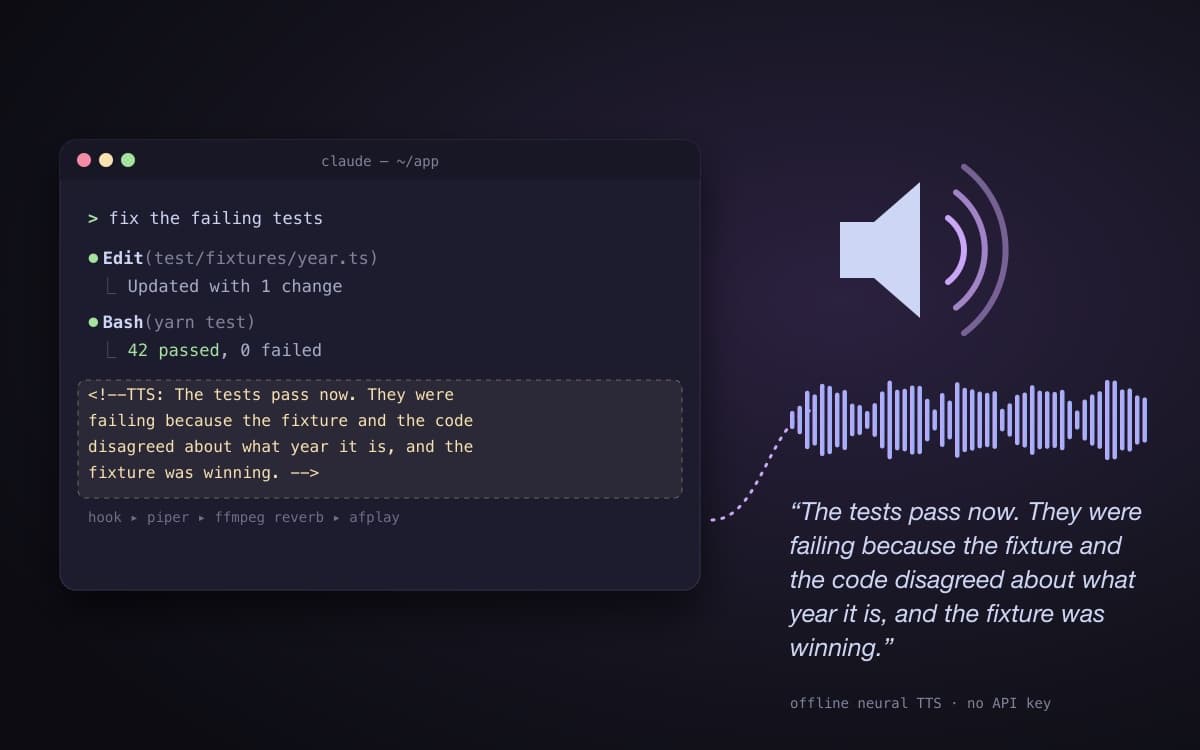
You kick off a task, go make coffee, and Claude Code tells you how it's going:
"The tests pass now. They were failing because the fixture and the code disagreed about what year it is, and the fixture was winning."
No API key, no cloud TTS service. Claude writes the line; Piper
speaks it locally, through an optional FFmpeg reverb, out of afplay.
- 🎙️ Narrates as it works: a marker at each milestone is spoken at the next tool call, or turn streaming off for one summary at the end.
- 🧠 Written by Claude, not scraped: the summary is something Claude chose to say, not your terminal output read aloud.
- 🎭 Has a personality dial: four tones (witty, neutral, warm, calm) times four strengths (subtle to max).
- 🗣️ Every English Piper voice: pick from the published British and American catalog, downloaded on demand at the best available quality.
- 🚦 Plays nicely with many sessions: playback is locked machine-wide so sessions queue instead of talking over each other, and a session can say its own name when it isn't the one you heard last.
- ⚡ Never blocks Claude: the hook forks the audio work into the background and returns immediately.
Install
One line. It clones the repo to ~/.claude-tts, adds the tts CLI to your
PATH in ~/.zshrc, and runs the interactive installer:
curl -fsSL https://raw.githubusercontent.com/melucasleite/claude-tts/main/get.sh | bash
Then restart Claude Code (or start a new session). That's it, it now narrates as it works.
Prefer to clone it yourself?
git clone https://github.com/melucasleite/claude-tts.git
cd claude-tts
./install.sh
export PATH="$HOME/.claude/bin:$PATH"   # add this to your shell profile for the `tts` command
get.sh honours two overrides: CLAUDE_TTS_DIR (clone location, default
~/.claude-tts) and CLAUDE_TTS_REPO (clone source).
What the installer does
install.sh is interactive, safe to re-run, and re-running it is how you
change your mind:
- Dependencies: installs
jqandffmpegvia Homebrew if missing, andpiper-ttsinto its own venv at~/.claude/piper-venv(so PEP 668 "externally managed" Pythons are left alone). - Hook + CLI: copies the runtime files into
~/.claudeand records a manifest sotts doctorcan tell whether what's installed matches the repo. - Voice: pick from five curated voices, hear a preview through the real pipeline, then keep it, replay it, or try another.
- Tone: choose how the summaries are written.
- Scope: global (every repo) or this repo only (
./.claude, falling back to global). - Config: writes
tts-voice.json, preserving any tuning you already have. - CLAUDE.md: renders the narration instructions, with your tone, into a delimited block it can later replace in place.
- Hooks: merges
StopandPostToolUsehooks into~/.claude/settings.jsonwithout touching your existing hooks. - Smoke test: speaks one line, so you know it works before you leave.
How it works
flowchart LR
    A["Claude's response<br/>with hidden TTS markers"] --> B["Claude Code hook<br/>PostToolUse / Stop"]
    B --> C["tts_speak.py<br/>reads the transcript,<br/>extracts + sanitizes markers"]
    C -->|"forks, returns instantly"| D["Piper<br/>neural TTS → WAV"]
    D --> E["FFmpeg<br/>reverb filter (optional)"]
    E --> F["afplay 🔈<br/>behind a machine-wide lock"]
The instruction. A managed block in your
CLAUDE.mdasks Claude to leave hidden HTML comments as it works, short (about 25 words mid-turn, 50 for the closer), in plain spoken English, and in your chosen tone:<!--TTS: The flaky test was a race in the cache warm-up. Fixed, and it now passes. -->HTML comments don't render, so you never see them in the conversation.
The hook. Claude Code runs
~/.claude/hooks/tts_speak.pyonPostToolUse(mid-turn) andStop(end of turn). It reads the session's JSONL transcript and finds the markers.- Stream mode (installer default) speaks every marker not yet spoken, in
order, tracking progress per session so nothing repeats. A marker is spoken
at the next tool call after it, so a mid-turn marker needs a tool call
behind it; anything left over is flushed at
Stop. - Final mode (
tts stream off) speaks only the last marker, atStop, and cuts off this session's previous summary if it's still playing.
- Stream mode (installer default) speaks every marker not yet spoken, in
order, tracking progress per session so nothing repeats. A marker is spoken
at the next tool call after it, so a mid-turn marker needs a tool call
behind it; anything left over is flushed at
The voice. Each marker is stripped of anything that reads badly aloud (markdown, links, backticks, bare URLs), capped at
max_chars, synthesized by Piper, passed through an FFmpeg filtergraph, and played withafplay. If FFmpeg is missing or fails, the raw Piper audio plays instead. Reverb is a nicety, not worth losing the narration over.Many sessions. A machine-wide playback lock means two Claude Code sessions never speak at once. With
announceonauto, a session prefixes its summary with its name ("at fix the parser.") only when the last thing you heard came from a different session. The name comes from Claude Code's session title, else the git branch, else the directory name.
The hook is a single standard-library Python file. The tts CLI imports the
same module, so tts test sounds exactly like the real thing.
The tts command
Tune everything by ear without editing JSON by hand.
tts test                       # speak a sample with your current settings
tts test --speed 1.3           # try a speed by ear (does not save)
tts test --voice en_US-amy-medium --no-reverb "hear this exact line"
tts test --label "auth bug"    # hear how a session label sounds
tts say "any text"             # same as test, text required

tts speed 1.3                  # save a speed (1.0 normal, >1 faster)
tts volume 1.2                 # save a volume multiplier
tts set sentence_silence 0.4   # set any config key

tts voice                      # pick from every English voice (downloads on pick)
tts voice ryan                 # switch by name, fetches best quality if missing
tts voices                     # list downloaded voices

tts tone                       # show the current tone and the choices
tts tone witty                 # switch tone (rewrites the CLAUDE.md block)
tts strength strong            # how hard to play the tone: subtle | medium | strong | max
tts announce always            # say which session is talking: auto | always | never

tts stream on | off            # narrate along the way, or only at the end
tts on | off                   # enable / disable all spoken summaries

tts show                       # print the resolved config and its source
tts doctor                     # check dependencies + config health
tts sync                       # re-install the runtime files from the repo
tts log                        # tail the debug log (when "debug": true)
tts test is the tuning loop: adjust with --speed / --volume /
--sentence-silence / --reverb until it sounds right, then persist with
tts speed / tts volume / tts set.
Configuration
Tone and strength
The voice only reads the words it's given, so the personality lives in the
instructions Claude follows. tts tone and tts strength re-render the managed
CLAUDE.md block; restart Claude Code for a change to take effect.
| Tone | Sounds like |
|---|---|
witty |
Dry, quick, and funny on purpose |
neutral |
Plain and factual, no editorializing |
warm |
Upbeat and encouraging |
calm |
Measured, documentary-style |
| Strength | How hard the tone is played |
|---|---|
subtle |
Held back, the tone barely shows |
medium |
The tone as written, evenly held (default) |
strong |
Committed, the voice leads, with room for a bit |
max |
Theatrical, every line performed |
Whatever the setting, the instructions hold one rule fixed: the narration must never misreport the work. Jokes are fine; claiming an action that didn't happen is not.
Voices
The installer offers five curated voices: Alan (British, the default), Ryan
(American, high quality), Amy, Jenny and Lessac. tts voice goes further: it
reads Piper's published voice index (cached, refreshed at most weekly) and
offers every en_GB and en_US voice at its best available quality. You can
name a voice by full key (en_US-ryan-high), without the quality
(en_US-ryan), or just by name (ryan). Models land in
~/.claude/piper-voices.
tts-voice.json
Config lives in tts-voice.json, either global at ~/.claude/ or per repo at
./.claude/. The hook uses the nearest one, walking up from the working
directory, and any key you leave out falls back to a built-in default.
| Key | Default | What it does |
|---|---|---|
enabled |
true |
Master switch (tts on / tts off) |
voice |
en_GB-alan-medium |
Piper model key |
tone |
calm |
witty, neutral, warm or calm |
strength |
medium |
subtle, medium, strong or max |
speed |
1.0 |
Speaking speed multiplier (>1 is faster) |
volume |
1.0 |
Volume multiplier, applied before reverb |
sentence_silence |
0.2 |
Seconds of pause after each sentence |
reverb |
aecho=0.8:0.9:40:0.25,volume=1.1 |
FFmpeg filtergraph; empty string plays raw Piper output |
ffmpeg |
ffmpeg |
FFmpeg binary |
player |
afplay |
Playback command |
stream |
true (installer) |
Speak each marker as the turn progresses, not just the last one |
max_chars |
5000 |
Runaway guardrail on characters spoken per marker |
interrupt |
true |
Final mode: a new summary stops this session's previous one |
lock_timeout |
120 |
Seconds to wait for the playback lock before speaking anyway |
announce |
auto |
Say the session's name: auto, always or never |
announce_template |
at {name}. |
How the session name is spoken |
announce_gap |
0.6 |
Seconds of silence between the name and the summary |
announce_window |
900 |
Ignore a "last speaker" record older than this many seconds |
debug |
false |
Write a debug log to ~/.claude/tts.log |
The installer writes your picked voice and tone over these. tts show prints
the resolved config and which file it came from.
Troubleshooting
Start with the doctor. It checks Python, piper-tts, FFmpeg, the player, the
voice model, the config file, whether the tone is applied to CLAUDE.md,
whether the installed code matches the repo, and whether the hooks are
registered, and says how to fix whatever fails:
tts doctor
| Symptom | Try |
|---|---|
| Silence after installing | Restart Claude Code; hooks and CLAUDE.md load at session start. |
| Voice model "not downloaded" | tts voice <key> fetches it. |
| Only hearing the end of each turn | Run tts stream on (it registers the PostToolUse hook). Mid-turn markers are spoken only when a tool call follows them. |
| No reverb | FFmpeg is missing or rejected the filtergraph; raw audio plays instead. Install FFmpeg or check reverb. |
| Changed tone or strength, nothing happened | Restart Claude Code (or start a new session). |
| Still stuck | tts set debug true, reproduce, then tts log. |
To update, re-run the one-liner: it fast-forwards ~/.claude-tts and runs the
installer again. tts sync re-copies the runtime files from the checkout.
Uninstall
~/.claude-tts/uninstall.sh            # remove the hooks + CLI (keeps voices and config)
~/.claude-tts/uninstall.sh --purge    # also remove config, voices, the piper venv,
                                      # and the TTS block in ~/.claude/CLAUDE.md
(Use ./uninstall.sh from wherever you cloned the repo.) Only hook entries
pointing at tts_speak.py are removed from settings.json; everything else
there is left alone. Blocks in per-repo CLAUDE.md files are not touched, so
remove those by hand if you used repo scope. Restart Claude Code afterwards.
Requirements
- macOS: playback uses
afplay - Python 3
- Homebrew: used to install FFmpeg and
jq - curl, jq, and git (for the one-line installer)
The installer checks for these and installs what it can. Voice models are about 60 MB each.
Development
The hook's pure logic (marker parsing, sanitizing, config, voice resolution, session naming, and more) is covered by unit tests that produce no audio:
python3 tests/test_tts_speak.py
Credits
- Piper for fast, local neural text to speech, and the piper-voices models.
- FFmpeg for the reverb.
- Claude Code hooks for the plumbing, and Claude for the writing.
License
MIT. Do whatever you like, no warranty.
more projectsls ~/projects
~/ai-desloper
Desloper scores how generic an AI-written landing page is against eight principles, with deterministic detectors plus a model judge, then hands you a fix prompt built from the findings you keep.
~/mark85
Iron Man suit firmware: four limb IMUs drive synthesized stereo servo whir and repulsor charge-up.
~/claude-usage-widget
Your Claude Code limits as Apple-Watch-style activity rings, with a forecast of when you'll hit them.
~/mini-kitchen
Toddler play kitchen with a sink that actually runs. CNC oak plywood, 12 V pump, Python-generated cut sheets.
~/speedster
A focused, dark-mode Rubik's cube timer for iOS: scrambles, rolling averages and progress charts.
~/age-of-potatoes
The source behind ageofpotatoes.com, golden-file tests for the deterministic sim included.