$ cd ~/projects/speedster
Speedster
A focused, dark-mode Rubik's cube timer for iOS: scrambles, rolling averages and progress charts.
- mobile
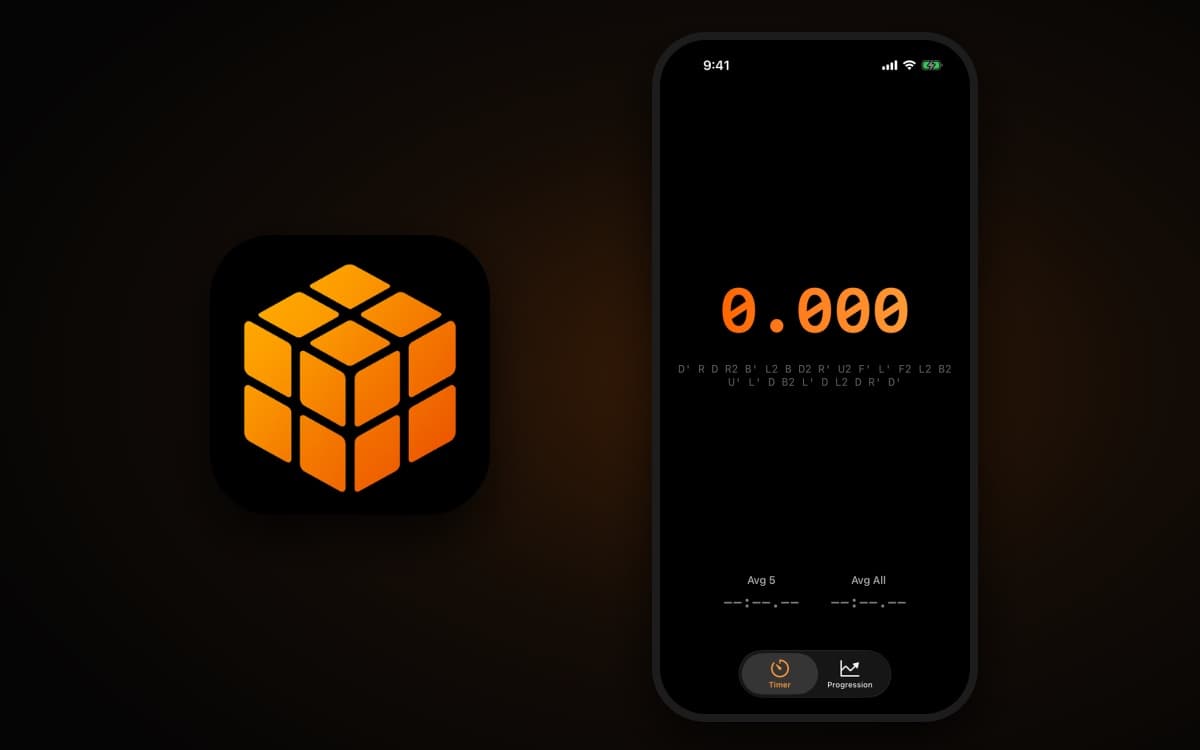
Speedster
A focused, dark-mode speedcubing timer for iPhone and iPad.
Tap to start, solve, tap to stop, and see right away whether you beat your last five.





Speedster is a native SwiftUI app for timing Rubik's cube solves. There are no accounts, no ads and no clutter. You get a big monospaced clock, a fresh scramble for every attempt, instant feedback on how you did, and a chart that shows whether you are actually getting faster.
✨ Features
⏱️ Timer
- Tap anywhere to start. The whole screen is the button.
- 5-second countdown before the clock starts, so you have time to get your hands on the cube. Tap during the countdown to cancel it; nothing is saved.
- Audible start cue. A short system "tock" plays when timing begins.
- Millisecond display. Times show as
s.mmm, orm:ss.mmmonce you pass a minute. - 25-move scrambles in standard notation (
U D F B L R, with'and2), shown under the timer between solves. A new one is generated after every solve.
🟢🔴 Instant feedback
When you stop the clock, the result stays on screen and is compared against your Avg 5 from before that solve:
- Green, with a ↓ arrow and "x.xxxs faster", if you beat it
- Red, with a ↑ arrow and "x.xxxs slower", if you didn't
Tap again to clear the result and get the next scramble.
📈 Progression
A second tab tracks your history:
- Summary cards: Total Solves, Best Time and Avg 5
- Trend chart (Swift Charts): individual solve times while you have fewer than 5 solves, then a rolling 5-solve average line once you have enough data
- Calendar browser: pick any day on a graphical date picker to list that day's solves, newest first, with time of day and result
- Cleanup: long-press a solve to delete it, or use Delete all data. Both ask for confirmation first.
🎨 Design
- Black background with orange-gradient accents, always in dark mode
- Universal app for iPhone and iPad, in portrait and landscape
🧠 How it works
The timer screen is a small state machine in TimerView.swift, driven entirely by taps:
stateDiagram-v2
    [*] --> Idle
    Idle --> Countdown: tap
    Countdown --> Idle: tap (cancel, nothing saved)
    Countdown --> Running: 5 s elapsed, play start sound
    Running --> ShowingResult: tap (solve saved)
    ShowingResult --> Idle: tap (new scramble)
- Timing: the clock records a start
Dateand recomputes elapsed time from it every 10 ms. Because the time is measured against that start point rather than by adding up ticks, a late timer tick never makes the result drift. - Scrambles: moves are picked at random from the six faces. The same face is never turned twice in a row, and a face is never followed by its opposite (
U/D,F/B,L/R). - Averages:
- Avg 5 is the plain mean of your 5 most recent solves.
- Avg All (on the timer screen) is the mean of every solve.
- Neither one drops the best and worst times the way a WCA-style ao5 does.
- Storage: each solve is a Core Data
Solveentity (timestamp,durationMillis), stored locally on the device byNSPersistentContainerinPersistence.swift. SwiftUI@FetchRequestkeeps both tabs up to date automatically.
🚀 Build & run
Requirements
- Xcode 26.1 or later (the project was created with Xcode 26.1)
- iOS 26.1+ simulator or device
- No third-party dependencies. Only SwiftUI, Swift Charts, Core Data and AVFoundation are used.
Steps
git clone https://github.com/melucasleite/speedster.git
cd speedster
open speedster.xcodeproj
- Select the speedster scheme and an iPhone or iPad simulator.
- To run on a physical device, choose your own team under Signing & Capabilities. You may also need to change the bundle identifier (
impulse.codes.speedster). - Press ⌘R.
🗂️ Project structure
speedster/
├── speedsterApp.swift        # App entry point; injects the Core Data context
├── ContentView.swift         # Tab bar: Timer + Progression
├── TimerView.swift           # Timer state machine, scrambles, averages, result feedback
├── ProgressionView.swift     # Stats cards, Swift Charts trend, calendar, deletion
├── SpeedsterTheme.swift      # Colors, orange/green/red gradients, typography
├── Persistence.swift         # NSPersistentContainer + in-memory preview data
├── speedster.xcdatamodeld/   # Core Data model (Solve entity)
└── Assets.xcassets/          # App icon
speedsterTests/               # Unit test target (Swift Testing)
speedsterUITests/             # UI test target (XCTest)
👤 Author
Built by Lucas Leite.
more projectsls ~/projects
~/ai-desloper
Desloper scores how generic an AI-written landing page is against eight principles, with deterministic detectors plus a model judge, then hands you a fix prompt built from the findings you keep.
~/mark85
Iron Man suit firmware: four limb IMUs drive synthesized stereo servo whir and repulsor charge-up.
~/claude-tts
Claude Code narrates its work out loud with offline neural TTS. Piper + FFmpeg, driven by hooks.
~/claude-usage-widget
Your Claude Code limits as Apple-Watch-style activity rings, with a forecast of when you'll hit them.
~/mini-kitchen
Toddler play kitchen with a sink that actually runs. CNC oak plywood, 12 V pump, Python-generated cut sheets.
~/age-of-potatoes
The source behind ageofpotatoes.com, golden-file tests for the deterministic sim included.