$ cd ~/projects/claude-usage-widget
Claude Usage Widget
Your Claude Code limits as Apple-Watch-style activity rings, with a forecast of when you'll hit them.
- desktop
- dev tools
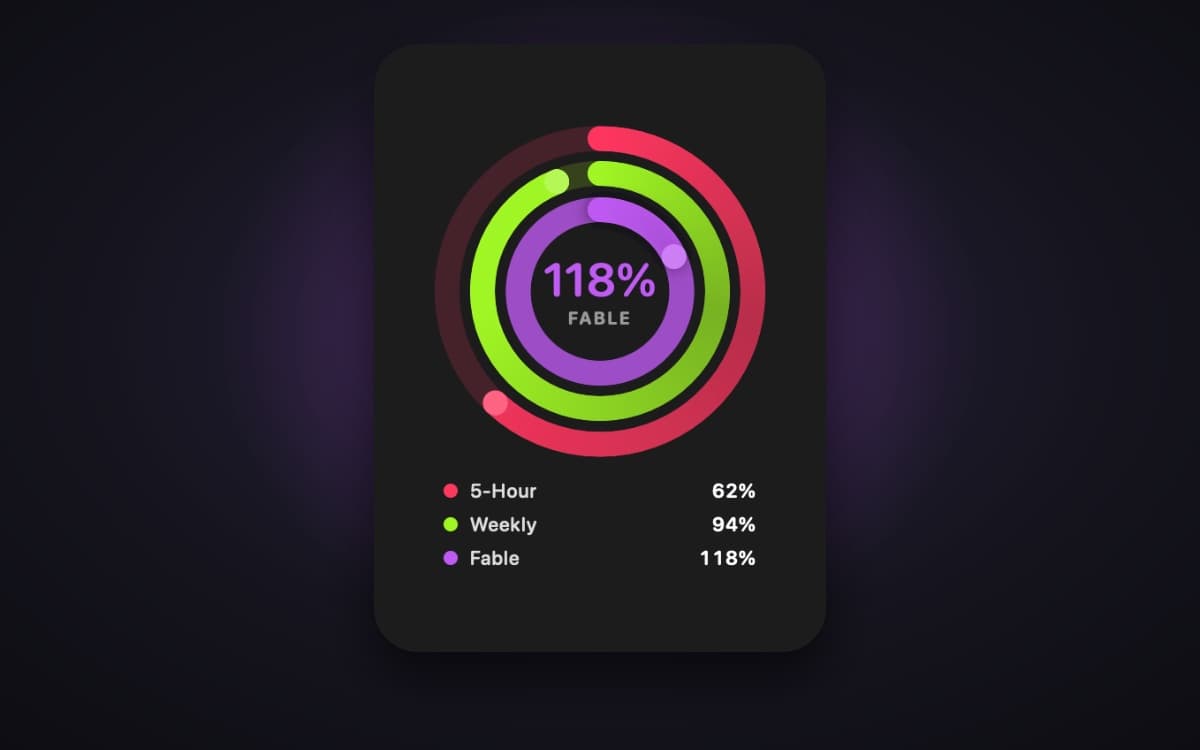

Claude Usage Widget
Your Claude Code limits, as Apple-Watch-style activity rings — always on top, one glance away.





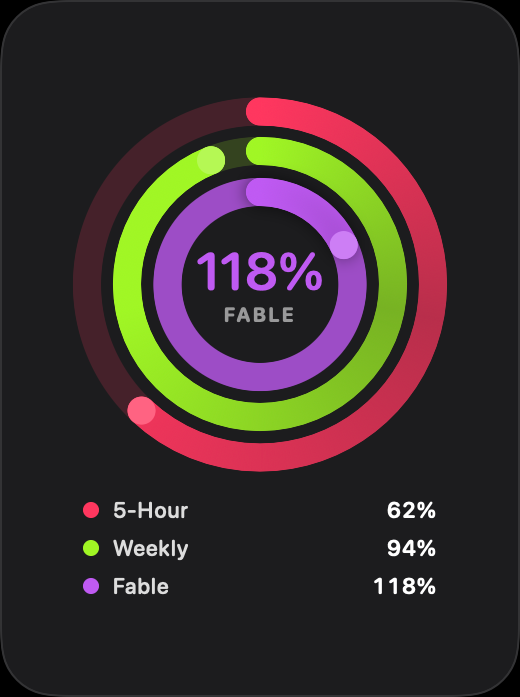
Demo values — rendered offscreen with --render-preview, so nobody's real usage is in this picture.
Claude Code's /usage tells you exactly how close you are to your limits — but
only when you stop and ask. Claude Usage Widget keeps the same numbers
floating on your desktop as three concentric rings, so you see a limit coming
long before it arrives. It reads the sign-in Claude Code already has, so there
is nothing to paste, and every percentage it shows came straight from
Anthropic's own usage endpoint.
✨ Highlights
- Three rings, three limits — the rolling 5-hour session, the weekly all-models limit, and the weekly Fable limit. Going over 100% draws a second lap, just like closing your Move ring twice.
- Forecast view — one click flips the widget to a chart of a limit's recent trajectory and answers the only question that matters: at this pace, do you hit 100% before the reset?
- Zero setup — reuses Claude Code's existing sign-in. No API key, no token to copy around.
- Honest numbers only — no local estimation, ever. If the data is not there, the ring says "—" instead of guessing.
- Polite to the API — polls every five minutes, caches the last reading so
relaunching is free, persists rate-limit backoff to disk, and shows a live
countdown instead of hammering a
429. - Native and lightweight — a borderless SwiftUI/AppKit panel with no Dock icon. Drag it anywhere, resize from any edge, keep it on every Space, or tuck it away behind a menu bar readout.
- Signed and notarized — download the
.dmg, drag to Applications, done.
| Ring | Colour | What it measures |
|---|---|---|
| 5-Hour | 🔴 red | Rolling 5-hour session window |
| Weekly | 🟢 green | 7-day rolling limit, all models |
| Fable | 🟣 violet | Weekly Fable-model limit |
Any ring can be switched off in Settings ▸ Rings.
📦 Install
- Download the latest
.dmg, open it, and drag Claude Usage Widget to Applications. - Make sure Claude Code is signed in on this Mac — if you have not already:
claude - Launch the app. If it cannot find a sign-in, a short setup guide opens with a Test connection button that makes one real request to prove it works.
Requirements: macOS 14 or later, Claude Code signed in with a Claude subscription.
[!TIP] To start it with your Mac, add it under System Settings ▸ General ▸ Login Items.
🖱️ Using it
| Do this | And |
|---|---|
| Hover a ring | The centre readout previews that ring; the tooltip adds the reset countdown. |
| Click a ring | Pins it to the centre (persists across relaunches). Click again to unpin — unpinned, the centre follows whichever ring is most urgent. |
| Hover the widget | Reveals controls: quit (top-left); forecast toggle, refresh and settings (top-right). |
| Drag / pull an edge | Moves or resizes the widget, with native macOS resize cursors. Position and size are remembered. |
| Right-click / menu bar | Full menu: Centre Shows, Always on Top, Hide Widget, Refresh Now (⌘R), Settings… (⌘,), Quit. |
Closing the widget quits the app — the widget is the app. To keep it running but out of sight, use Hide Widget instead.
📈 Forecast view
Toggle it from the hover controls. It charts one limit — what the API reported is a solid line, the projection is dashed, and the reset sits on its own dashed vertical line — then gives a verdict such as "On pace to hit 100% in 3h 10m — 40m before the reset" or "Reset in 2h 5m beats your pace". It needs about an hour of readings before it will call a trend; the pill switcher at the bottom picks which limit to forecast.
⚙️ How it works
flowchart LR
    A["Claude Code sign-in<br/>(macOS Keychain)"] -- read only --> W["Claude Usage Widget"]
    W -- "GET /api/oauth/usage<br/>every 5 min" --> API["api.anthropic.com"]
    API -- "exact percentages<br/>+ reset times" --> W
    W --> R["Rings · forecast<br/>menu bar readout"]
- One data source:
GET https://api.anthropic.com/api/oauth/usage— the same endpoint/usageinside Claude Code talks to. It returns exact percentages and reset times; the widget draws them and nothing else. - One credential: the OAuth sign-in Claude Code stores in your Keychain
(or
~/.claude/.credentials.json). It is only ever read. - Gentle polling: every 5 minutes by default (adjustable from 1 to 15 in Settings ▸ Connection), with a hard 20-second floor between requests no matter what triggers them.
- Local state — settings, the cached last reading, rate-limit backoff and
up to 8 days of usage history for the forecast — lives in
~/Library/Application Support/ClaudeUsageWidget/. No credential is ever written there.
🔒 Privacy & security
- The credential is only ever read — never written, copied or cached: not
to
config.json, not to logs, not to disk. - The only network request the app makes is the usage call to
api.anthropic.com. - It reads through
/usr/bin/securityfirst. Claude Code creates its Keychain item with that same tool, which puts it on the item's access list, so the read is silent rather than a Keychain prompt. OAuthCredentialsprints itself as<redacted>, and a unit test asserts it — removing the redaction turns the build red.--checkdiagnostics never print a token value, only metadata such as expiry.- No credential of any kind is in this repository, and
.gitignorecarries backstop patterns to keep it that way.
🩺 Troubleshooting & FAQ
The widget says "Start a Claude Code session to get your stats".
Claude Code's stored sign-in expires every few hours, and only actually using Claude Code renews it. Rather than retrying against a wall all night (an expired token refuses every request identically), the widget stops requesting entirely and watches the Keychain instead. Start a Claude Code session and it picks up the fresh credential on its own.
Why can't I just use claude setup-token?
Because the endpoint refuses it, and says so precisely:
HTTP 403
permission_error: OAuth token does not meet scope requirement user:profile
Claude Code's interactive login requests user:profile user:inference user:sessions:claude; setup-token grants inference only. No amount of
regenerating it will add the missing scope. The desktop app is no help either:
it keeps a claude.ai web session in an Electron cookie jar, not an OAuth bearer
token.
The rings show a countdown instead of numbers.
The usage endpoint is rate limited more tightly than it looks. When it answers
429, the widget shows how long the wait is and resumes by itself the moment
it ends — clicking Refresh during a long server-directed wait would only
deepen it. The backoff is persisted to disk, so quitting and relaunching does
not reset it.
Ask the app what is wrong: --check
/Applications/ClaudeUsageWidget.app/Contents/MacOS/ClaudeUsageWidget --check
Reports which Keychain items it found, whether the credential parsed and when
it expires, whether the endpoint answered, and which rings resolved. It honours
any active rate-limit wait; pass --force to query anyway (which will probably
deepen the wait). If you built from source, the binary is at
./dist/ClaudeUsageWidget.app/Contents/MacOS/ClaudeUsageWidget.
Why isn't it on the Mac App Store?
The Mac App Store requires sandboxing, and a sandboxed app cannot read Claude
Code's Keychain item or invoke /usr/bin/security — which is every one of this
app's data paths. So it ships the way most Mac utilities do: Developer ID +
notarization.
🛠️ Build from source
Not needed to use it — the release is the easy path. This is for hacking on it.
git clone https://github.com/melucasleite/claude-usage-widget.git
cd claude-usage-widget
./Scripts/build-app.sh --run
That builds dist/ClaudeUsageWidget.app with plain SwiftPM — no .xcodeproj
required — and launches it.
| Command | What it does |
|---|---|
swift build / swift test |
Day-to-day build and tests |
./Scripts/build-app.sh [--run] |
Build the .app bundle into dist/ (--debug for debug) |
./Scripts/make-icon.sh <png> |
Regenerate Resources/AppIcon.icns from a square PNG |
./Scripts/make-dmg.sh <version> |
Build a drag-to-Applications disk image |
./Scripts/release.sh <version> |
Sign, notarize, staple, package and publish a GitHub Release |
[!NOTE] SwiftUI's
@Stateand friends are macros, expanded by a plugin that ships inside Xcode and not with the standalone Command Line Tools. The build script finds any installed Xcode automatically and borrows it viaDEVELOPER_DIR— noxcode-select, nosudo. Override it if you like:DEVELOPER_DIR=/Applications/Xcode.app/Contents/Developer ./Scripts/build-app.sh
build-app.sh signs with a real certificate when it finds one (set
CODESIGN_IDENTITY to choose), because Keychain grants bind to code identity
and an ad-hoc signature is invalidated by every rebuild.
Tests
swift test
Covers the parts that fail quietly: decoding a payload whose keys are not guaranteed, resolving Fable by display name and by codename fallback, treating a null model window as 0%, credential parsing and redaction, ring hit-testing, trend and projection maths, and the rule that cosmetic settings never trigger a network call.
🔬 Under the hood: the unofficial usage endpoint
The endpoint is unofficial and undocumented. A trimmed, illustrative response:
{
  "five_hour": { "utilization": 30.0, "resets_at": "..." },
  "seven_day": { "utilization": 47.0, "resets_at": "..." },
  "seven_day_omelette": null,
  "limits": [
    {
      "kind": "weekly_scoped",
      "percent": 3,
      "scope": { "model": { "display_name": "Fable" } }
    }
  ]
}
Things worth knowing if you build something similar:
- The
limitsarray is the authoritative source. Each row has akind(session,weekly_all,weekly_scoped) and, for per-model rows, the model's display name. The widget reads all three rings from it first. - Top-level per-model keys are internal codenames, not model names. There
is no
seven_day_fable; a live response carries keys likeseven_day_omelettealongside decoys such ascinder_coveandnimbus_quill. An earlier version guessed the mapping and the Fable ring sat at 0% while real usage climbed — which is whylimitsnow wins. The codename lookup survives only as a fallback for responses withoutlimits, and can be pinned withfableWindowKeyinconfig.json. nullmeans 0%, not "unavailable". A per-model key that is present but null means the window applies to your account with no usage yet — which is how/usagerenders it.User-Agent: claude-code/<version>is not optional in practice. Without it you land in an aggressively rate-limited bucket and get persistent429s.- There is deliberately no local estimation. An earlier version derived percentages from transcript token counts when the API was unreachable, which meant inventing a denominator — and it once confidently displayed 3704%. The forecast view is the one piece of local arithmetic, it uses only readings the API returned, and it is always drawn dashed and labelled as a projection.
- Backoff is persisted. Keeping it in memory quietly defeats it: a handful
of relaunches can turn a short
Retry-Afterinto an hour-long one. The last successful response is cached too, so relaunching costs no request.
🧭 Architecture
Sources/ClaudeUsageWidget/
├── main.swift                    entry point; --check and --render-preview
├── App/
│   ├── AppDelegate.swift         wiring, windows, main menu
│   ├── WidgetPanel.swift         borderless, non-activating, resizable NSPanel
│   ├── StatusItemController.swift  menu bar readout and menu
│   ├── Diagnostics.swift         --check
│   └── PreviewRenderer.swift     --render-preview
├── Core/
│   ├── Models.swift              RingMetric, RingDatum, UsageSnapshot
│   ├── Config.swift              settings, persisted as JSON
│   └── UsageHistory.swift        recorded readings and trend projection
├── Data/
│   ├── CredentialStore.swift     reads Claude Code's credential; redaction
│   ├── OAuthUsageProvider.swift  the endpoint and its tolerant decoder
│   └── UsageCoordinator.swift    refresh loop, cache, persisted backoff
└── UI/
    ├── ActivityRingsView.swift   adaptive geometry, overflow laps
    ├── WidgetView.swift          rings, forecast, or the sign-in prompt
    ├── ForecastView.swift        trajectory chart and verdict
    ├── WaitingView.swift         rate-limit countdown
    ├── OnboardingView.swift      sign in → test connection
    └── SettingsView.swift        Appearance · Rings · Connection
🚀 Distribution & releasing
Generating the Xcode project
Everyday work needs no Xcode project. But a Swift package opened in Xcode has
no Signing & Capabilities tab and no Product ▸ Archive, so for the Organizer
flow you need a real App target, generated from project.yml by XcodeGen:
brew install xcodegen && DEVELOPMENT_TEAM=YOURTEAMID xcodegen generate && open ClaudeUsageWidget.xcodeproj
Pass DEVELOPMENT_TEAM rather than setting the team in Xcode's UI — the UI
writes it into the generated project, which the next xcodegen generate
overwrites. project.yml is the source of truth; the .xcodeproj is
git-ignored. Hardened runtime is enabled there (notarization rejects builds
without it) and the sandbox is explicitly off, for the reasons in the FAQ.
Signing certificates: the iOS gotcha
| Certificate | What it is for | Works outside the store? |
|---|---|---|
| Apple Development | local builds, registered devices | no — blocked on other Macs |
| Apple Distribution | App Store / TestFlight submissions | no — not a Gatekeeper identity |
| Developer ID Application | direct distribution | yes |
Coming from iOS, Apple Distribution is the trap: it reads as the "release" certificate, but it is not accepted for notarized direct distribution. Create a Developer ID Application certificate in Xcode ▸ Settings ▸ Accounts ▸ Manage Certificates ▸ + (paid Apple Developer Program, Account Holder only), then verify:
security find-identity -v -p codesigning | grep "Developer ID Application"
You can confirm the chain before ever archiving:
CODESIGN_IDENTITY="Developer ID Application: Your Name (TEAMID)" ./Scripts/build-app.sh && spctl -a -vvv -t install dist/ClaudeUsageWidget.app
A correctly signed but not-yet-notarized app reports rejected with
source=Unnotarized Developer ID — the expected result at that stage.
Cutting a release
Store notarization credentials once (needs an app-specific password from appleid.apple.com):
xcrun notarytool store-credentials "ClaudeUsageWidget" --apple-id you@example.com --team-id YOURTEAMID
Then:
./Scripts/release.sh 1.2.0
It signs with the Developer ID certificate, notarizes, staples, builds the
drag-to-Applications .dmg (notarized and stapled separately from the app
inside it, since Gatekeeper assesses the container you double-click), writes a
SHA-256 checksum, and creates the GitHub Release. It fails early on a missing
hardened runtime or secure timestamp, and re-runs the Gatekeeper check on a
copy tagged with a download quarantine flag — because an app can pass on the
machine that built it and still be refused as a download. Useful flags:
--no-publish, --draft, and --app PATH to reuse an existing build.
Release notes
Notes are written as the work happens, one line per user-visible change, in
ReleaseNotes/Unreleased.md (rules in ReleaseNotes/CLAUDE.md, so an agent
working in the repo keeps it current too). release.sh archives them to
ReleaseNotes/v<version>.md, publishes them in the release body, resets the
scratch file — and refuses to release when it is empty.
App icon and screenshots
./Scripts/make-icon.sh ~/Downloads/your-icon.png
Generates the full ten-size Resources/AppIcon.icns with sips and iconutil
(both ship with macOS); a non-square source is padded, not cropped.
./dist/ClaudeUsageWidget.app/Contents/MacOS/ClaudeUsageWidget --render-preview docs/rings.png
Renders the README image offscreen from fixed demo values, without touching the
network. --forecast and --waiting render those views instead.
⚠️ Caveats
- The usage endpoint is unofficial. If it changes, the rings go quiet and say so — there is no fallback that invents numbers.
- Requires Claude Code signed in with a Claude subscription that has usage limits to report.
- An independent project, not affiliated with or endorsed by Anthropic.
📄 License
MIT — see LICENSE.
more projectsls ~/projects
~/ai-desloper
Desloper scores how generic an AI-written landing page is against eight principles, with deterministic detectors plus a model judge, then hands you a fix prompt built from the findings you keep.
~/mark85
Iron Man suit firmware: four limb IMUs drive synthesized stereo servo whir and repulsor charge-up.
~/claude-tts
Claude Code narrates its work out loud with offline neural TTS. Piper + FFmpeg, driven by hooks.
~/mini-kitchen
Toddler play kitchen with a sink that actually runs. CNC oak plywood, 12 V pump, Python-generated cut sheets.
~/speedster
A focused, dark-mode Rubik's cube timer for iOS: scrambles, rolling averages and progress charts.
~/age-of-potatoes
The source behind ageofpotatoes.com, golden-file tests for the deterministic sim included.